
Android POS vs Windows POS: Which Hardware is Better for Retail Stores?
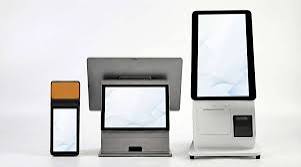
If you've ever sat down to research POS hardware for your shop and found yourself going in circles — Android tablet? Windows terminal? All-in-one machine? — you're not alone. It's one of the most common questions retail business owners ask when they're setting up or upgrading their point of sale system.
And it's a genuinely important question. The device sitting at your checkout counter isn't just a screen — it's the thing your staff interact with dozens or hundreds of times every single day. The wrong choice leads to slow checkouts, frustrated cashiers, unexpected repair costs, and software that doesn't play nicely with your tools.
The good news? There's no universally "correct" answer. Both Android and Windows POS hardware have real strengths — and real limitations. The right choice depends on your business size, budget, how your shop operates, and what software you plan to run.
This guide breaks it all down clearly, without the technical jargon. By the end, you'll know exactly which direction makes sense for your retail store.
A Quick Overview: What Are We Actually Comparing?
When people say "Android POS," they typically mean a touchscreen tablet or handheld device running Google's Android operating system, loaded with a point of sale app. Think of something that looks like a large smartphone or tablet mounted at a checkout counter.
"Windows POS" refers to a dedicated terminal running Microsoft Windows — often an all-in-one touchscreen machine that looks more like a traditional desktop, or a fanless embedded PC with a separate monitor. These devices run full Windows operating systems (usually Windows 10 or 11 IoT) and desktop-grade POS software.
Both can connect to the same peripherals — barcode scanners, receipt printers, cash drawers — and both can run cloud-based POS software. So the comparison really comes down to cost, durability, flexibility, and fit for your specific retail environment.

Modern retail checkout — the hardware choice shapes the entire customer experience.
Android POS: The Case For It
Android has become the dominant platform for retail POS in small and medium businesses — and there are very practical reasons for that.
Cost
This is the big one. A solid Android tablet suitable for a retail POS setup — think a 10-inch screen, decent processor, 3–4GB RAM — can cost between ₦60,000 and ₦150,000 depending on the brand. Compare that to a Windows all-in-one terminal, which typically starts around ₦250,000 and can climb significantly higher. For a business setting up two or three checkout counters, the savings are substantial.
Ease of Use
Most people in Nigeria are already familiar with Android from their personal smartphones. That familiarity matters more than it might seem. When you hire a new cashier, the learning curve on an Android POS app is significantly shorter than on a Windows desktop application. Less training time means faster onboarding and fewer mistakes during the adjustment period.
Portability
Android tablets are lightweight and untethered. If your business layout changes, if you want a mobile cashier at a market stand, or if you want the flexibility to take orders on the shop floor rather than only at a fixed counter — Android makes that possible without any extra infrastructure.
Lower Maintenance Costs
Android devices are widely available, easily replaced, and serviced by technicians across Nigeria. If a device breaks, you can get a replacement running the same day. With a Windows terminal, especially a proprietary one, replacement parts and servicing can be harder to source locally.

Android tablets offer retail businesses flexibility, low cost, and familiar usability.
Limitations of Android POS
Android isn't without its trade-offs. Cheaper Android tablets can feel sluggish under heavy use. Some older devices don't handle high transaction volumes well during peak hours. Battery life matters too — if you forget to charge a tablet overnight, you're starting the day with a low battery at your checkout counter.
Android also tends to receive automatic OS updates that, in rare cases, can disrupt POS app behaviour. It's worth setting devices to manual update and testing updates before applying them to your checkout terminals.
Windows POS: The Case For It
Windows POS terminals have been the backbone of enterprise retail for decades. There are very good reasons they're still the preferred choice for certain types of businesses.
Raw Performance
A Windows POS terminal is, in computing terms, a full PC. It has a proper processor, dedicated storage, and the ability to handle complex operations simultaneously — running your POS software, processing database queries, printing receipts, and managing multiple peripherals without breaking a sweat. For very high-volume environments, this raw horsepower can make a difference.
Software Compatibility
Some legacy or industry-specific software only runs on Windows. If your business uses accounting software, enterprise resource planning tools, or other desktop applications that need to be on the same machine as your POS, Windows gives you that compatibility. On Android, you're limited to apps built for mobile platforms.
Peripheral Support
Windows terminals typically have more USB ports, support for a wider range of peripherals, and driver support for virtually every receipt printer, scanner, and cash drawer on the market. On Android, peripheral compatibility can sometimes require specific app support or Bluetooth connections rather than standard USB drivers.

Windows terminals offer enterprise-grade performance and broader peripheral support.
Limitations of Windows POS
The cost is the most obvious barrier. A quality Windows POS terminal is two to four times the price of an equivalent Android tablet setup. For a small or medium retail business in Nigeria, that's a significant capital outlay — especially if you need multiple checkout stations.
Windows machines also require more maintenance. They're susceptible to viruses, need regular software updates, and can be affected by the same performance degradation over time that any Windows PC experiences. They're also heavier, harder to move, and less flexible in terms of setup options.
And if a Windows terminal fails? Repair is often slower and more expensive than simply swapping in a replacement Android device.
Side-by-Side Comparison
Which One Should You Actually Choose?
Here's a practical way to think about it.
Choose Android POS if:
- You're a small to medium retail business — supermarket, pharmacy, mini-mart, electronics shop
- Budget is a real consideration and you're equipping 2–5 checkout counters
- You want cloud-based POS software that works across multiple devices
- Your staff aren't highly technical and you want a short learning curve
- You want flexibility — the ability to move devices, add counters, or replace hardware quickly
- You're based in Nigeria and want hardware that's easy to source and service locally
Consider Windows POS if:
- You run a large enterprise retail operation with extremely high daily transaction volumes
- You need to integrate your POS with existing Windows-only accounting or ERP software
- You have a dedicated IT team to manage and maintain the hardware
- Capital cost is not a significant constraint for your business
For the vast majority of retail businesses in Nigeria — from neighbourhood supermarkets to growing pharmacy chains — Android POS is the more practical, cost-effective, and scalable choice. The hardware is accessible, the software ecosystem has matured significantly, and cloud-based platforms handle everything that desktop software used to lock behind expensive hardware.
The Hardware Choice Is Only Half the Decision
Here's something that often gets lost in the Android vs Windows debate: your POS software matters just as much as — arguably more than — your hardware.
A great Android tablet running poor software will frustrate your staff and leave you with incomplete data. A quality cloud POS platform running on a mid-range Android device, on the other hand, will give you real-time inventory tracking, automated sales reports, staff management, customer credit records, and full business visibility — all without requiring expensive hardware.
This is where SwiftPOS fits into the picture. It's a cloud-based POS and retail management platform built specifically for Nigerian businesses — and it runs cleanly on Android devices, making it a natural companion to an Android-first hardware strategy.

SwiftPOS Dashboard — total business overview, daily revenue, and key metrics in one place.
Whether you're running a single checkout counter or managing multiple shop locations, SwiftPOS handles POS sales, inventory updates, staff tracking, customer credit management, and financial reporting — all in one system, accessible from your Android device or any browser.
Plans start at ₦3,000/month for the Starter tier, scaling up to ₦12,000/month for the Pro plan with multi-branch support and advanced audit tools. You can explore what's included at swiftpos.ng/pricing.
Common Questions
Can I use a regular Android phone as a POS terminal?
Technically yes, but it's not ideal for a retail shop. A phone screen is too small for a cashier handling multiple items, and it's not practical to mount securely at a counter. A 10–12 inch tablet is the right form factor for a retail POS.
Can Android POS handle barcode scanners and receipt printers?
Yes. Most modern cloud POS apps — including SwiftPOS — support USB and Bluetooth barcode scanners and Bluetooth thermal receipt printers. Connectivity is smooth when you use hardware that's listed as compatible with your POS software.
Is Android POS secure enough for a retail business?
Yes, when managed properly. Keep devices on a dedicated Wi-Fi network, enable PIN/fingerprint lock, and use a cloud POS platform with role-based access controls so staff can only see and do what their role allows. SwiftPOS includes audit logs and permission settings for exactly this purpose.
What happens if my Android device breaks?
Because your data lives in the cloud and not on the device, a broken tablet doesn't mean lost sales records. Simply log into your SwiftPOS account on another Android device and you're back in business — often within minutes.
Which Android tablet brands work well for retail POS in Nigeria?
Samsung Galaxy Tab A series, Lenovo Tab M series, and Tecno tablets are commonly used and widely available. For best performance, aim for at least 3GB RAM, a Helio G80 or equivalent processor, and Android 10 or higher.
The Bottom Line
Android POS or Windows POS — it's not really a question of which is objectively "better." It's a question of what fits your business right now and where you're headed.
For most retail shops in Nigeria — supermarkets, pharmacies, mini-marts, clothing stores, electronics shops — Android POS is the smarter starting point. It costs less, it's easier to manage, it's widely available, and the cloud software available for it has become genuinely powerful. You're not compromising on capability; you're making a practical, modern choice.
Windows POS still has its place in large enterprise environments — but for the overwhelming majority of retail business owners reading this, Android is where to start.
Get the hardware sorted. Then make sure the software running on it is doing the heavy lifting for you.
Running your shop on Android? SwiftPOS was built for you.
Manage sales, inventory, staff, and customers from any Android device. No expensive hardware required — just a solid tablet and a reliable cloud POS system designed for Nigerian retail.
👉 See plans and pricing at swiftpos.ng/pricing
💬 Chat with us on WhatsApp: +2349164601810
🎁 Subscribe annually on any plan and get your first month completely free.
