
Complete POS Hardware Setup for Supermarkets (Scanner, Printer, Cash Drawer & More)
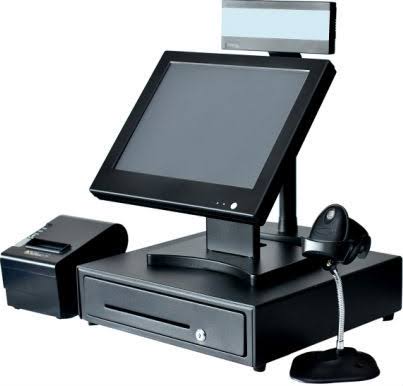
Running a supermarket is not the same as running a small corner shop. The volume of customers, the size of the product catalogue, the number of staff on the floor, and the pace of daily transactions are all in a completely different league. And when it comes to your point of sale setup, that difference matters — enormously.
Walk into any well-run supermarket today and you'll notice something: the checkout process is fast, organised, and almost effortless. Products get scanned in seconds. Receipts print automatically. Cash is counted cleanly. Stock levels update in the background without anyone lifting a pen. None of that happens by accident. It happens because the right hardware is in place, connected to the right software, working together as a system.
If you're opening a new supermarket, upgrading your existing checkout setup, or finally moving away from manual records and scattered notebooks — this guide is for you. We'll walk you through every piece of hardware you need, what each one does, how to set it up, and how to connect it all to a cloud-based POS system that gives you real-time visibility over your entire business.
Let's build your supermarket POS setup — the right way.
Why Supermarkets Need a Dedicated POS Hardware Setup
A supermarket has unique operational demands that differ from other retail formats. On any given day, your checkout counters may handle hundreds — or thousands — of transactions. Your shelves carry dozens of product categories. Your staff rotate across different shifts. Customers pay with cash, transfer, and increasingly, mobile money.
All of this creates a business environment where precision is critical. A wrong price entered manually can cause revenue loss. A barcode scanner that jams during rush hour creates queues that drive customers away. A receipt printer that runs out of paper mid-transaction is an embarrassment that erodes trust.
The right POS hardware setup eliminates these pain points. More importantly, when paired with a cloud-based system like SwiftPOS, it transforms your checkout counter from a simple payment point into a full data engine — tracking sales, updating inventory, flagging low stock, recording staff performance, and generating daily reports automatically.

SwiftPOS Grid POS Terminal — fast visual checkout interface designed for high-volume retail environments.
The Complete Supermarket POS Hardware Checklist
Before we go into the details of each component, here's the full hardware list for a properly equipped supermarket checkout station:
- POS Terminal or Touchscreen Tablet — the main device your cashier operates
- Barcode Scanner — for fast, accurate product scanning
- Thermal Receipt Printer — to print customer receipts instantly
- Cash Drawer — for organised, secure cash management
- Customer Display Screen — so customers see what's being charged in real time
- UPS / Power Backup — to keep operations running during power outages
- Internet Router / Mobile Data Backup — for reliable cloud connectivity
- Cloud POS Software — the brain that connects and manages all of the above
Each item on this list plays a specific role. Let's go through them one by one.
Step-by-Step Hardware Setup Guide for Supermarkets
Step 1: Choose Your POS Terminal
Your POS terminal is the centrepiece of your checkout station. It's the device your cashier interacts with for every transaction — selecting products, applying discounts, processing payments, and closing sales.
For supermarkets, you have two main options:
- Dedicated touchscreen POS terminal — purpose-built for retail, typically more durable and comes with built-in peripherals. Best for high-volume checkout counters.
- Android tablet (10–12 inch) — a cost-effective option that works perfectly when running a cloud POS app like SwiftPOS. Easier to replace and scale.
For a supermarket running multiple checkout counters, Android tablets mounted on stands are a popular and budget-friendly choice that doesn't sacrifice performance.
Recommended specs: minimum 10-inch screen, 3GB RAM or more, Android 10 or higher, fast processor (Snapdragon or MediaTek Helio series).
Step 2: Install a Barcode Scanner
For a supermarket, a barcode scanner is non-negotiable. With hundreds or thousands of SKUs across your shelves, manually entering product names or codes at checkout is not feasible — and it's a recipe for pricing errors, frustrated customers, and inaccurate stock records.
A barcode scanner connects to your POS terminal (via USB or Bluetooth) and pulls up the exact product, price, and stock details the moment an item is scanned. Checkout becomes several times faster, and your inventory updates automatically with every sale.

SwiftPOS Barcode POS Terminal — scan-to-sell with automatic inventory deduction on every transaction.
Types of scanners for supermarkets:
- Handheld USB scanner — reliable and affordable. Best for standard checkout counters.
- Wireless Bluetooth scanner — gives cashiers mobility. Ideal for large floor areas.
- Presentation/horizontal scanner — hands-free scanning for high-volume cashier points. The cashier passes items over the scanner rather than picking it up each time.
SwiftPOS supports full barcode scanning through its dedicated Barcode POS interface, available on the Standard and Pro plans.
Step 3: Set Up Your Thermal Receipt Printer
Every purchase in your supermarket should end with a printed receipt. It builds customer trust, provides a record for dispute resolution, and gives your business a professional image.
Why thermal? Thermal printers use heat rather than ink to print on special paper. This means no ink cartridges to replace — a significant running cost saving for a busy supermarket. They're also fast (printing a full receipt in under two seconds) and quiet.
What to look for in a supermarket receipt printer:
- Printing speed of at least 200mm/second
- 80mm paper width (the industry standard)
- USB + Bluetooth connectivity for flexible installation
- Auto-cutter for clean, separated receipts
- Compatibility with your cloud POS software
SwiftPOS supports branded receipt printing — your supermarket name, logo, address, and contact information print on every receipt automatically. This gives every transaction a professional, trusted finish.
Step 4: Add a Cash Drawer
Cash transactions remain very common in Nigerian supermarkets, and a proper cash drawer is essential for managing them correctly. A cash drawer connected to your receipt printer opens automatically at the completion of each cash transaction — eliminating the need for cashiers to manually unlock drawers and reducing the risk of errors or theft.
What to look for:
- Sturdy steel construction — avoid lightweight plastic drawers
- Multiple bill slots (at least 5) and coin compartments
- RJ11 port connection to your receipt printer (industry standard)
- Lockable for end-of-day security
- Removable cash tray for easy counting
At the end of each day, SwiftPOS generates an End of Day Reconciliation report that helps you balance your drawer against recorded sales — making closing time faster and more accurate.

SwiftPOS End of Day Reconciliation — balance your cash drawer against recorded sales in minutes.
Step 5: Install a Customer-Facing Display
A customer display screen is mounted at the checkout counter facing the customer. It shows each product as it is scanned — including the name and price — along with the running total and the final amount due.
This might seem like a small detail, but it makes a meaningful difference. Customers feel more confident when they can see exactly what they're being charged for. Disputes about prices are minimised. And the overall checkout experience feels transparent and professional.
For supermarkets, where customers are often purchasing 10–30 items in a single transaction, a customer display screen is a strong trust-builder.
Step 6: Ensure Power Backup (UPS)
Power interruptions are a reality for retail businesses in Nigeria. Without a backup power solution, a sudden outage mid-transaction can cause data loss, confuse customers, and disrupt your entire checkout flow.
A UPS (Uninterruptible Power Supply) keeps your POS terminal, scanner, printer, and network router running for a period after the main power goes out — giving your staff enough time to complete current transactions cleanly and shut down systems properly if needed.
Recommended per checkout station: a UPS rated at 650VA–1000VA, which typically provides 20–40 minutes of backup time for a standard POS hardware setup.
Step 7: Set Up Your Internet Connection
Cloud POS software depends on internet connectivity. For a supermarket, reliable internet is not a luxury — it's infrastructure. Your setup should include:
- Primary connection: fibre broadband or high-speed DSL router covering the shop floor
- Backup connection: a 4G LTE SIM router (different network from your primary) for automatic failover
- Wi-Fi coverage: ensure strong signal reaches every checkout point — use Wi-Fi extenders if needed
SwiftPOS is designed with Nigerian business realities in mind. The platform handles brief connectivity interruptions gracefully, continuing to record transactions locally and syncing to the cloud once the connection is restored.
Step 8: Connect Everything to Your Cloud POS Software
Hardware without the right software is just equipment. The final and most important step is connecting all of your devices to a cloud-based POS platform that ties everything together.
Your cloud POS software should:
- Process sales through your POS terminal in real time
- Receive barcode scan data and pull up correct product records
- Trigger your receipt printer at the end of every transaction
- Open your cash drawer automatically on cash sales
- Update your inventory automatically with every item sold
- Track staff performance and access levels
- Generate daily, weekly, and monthly reports
- Alert you when stock is running low

SwiftPOS Inventory Dashboard — real-time stock levels, low-stock alerts, and full product visibility across your supermarket.
SwiftPOS does all of this — and more. It's built specifically for retail businesses in Nigeria, with plans that scale from a single-counter mini-mart all the way to multi-branch supermarket chains.
Managing Staff Across Your Supermarket Checkout Counters
A supermarket with multiple checkout counters means multiple cashiers — and that introduces staff management complexity. Who sold what? Which cashier had a discrepancy? Who discounted a product without authorisation?
With SwiftPOS, every cashier logs in with their own credentials. All sales are recorded against the individual staff member, and managers can view performance reports, audit logs, and suspicious activity flags from a central dashboard.

SwiftPOS Staff Management — assign roles, set permissions, and track every cashier's activity across your supermarket.
The Pro plan supports up to 15 staff accounts, making it suitable for supermarkets with multiple cashiers across shifts. The suspicious activity monitoring feature automatically flags unusual patterns — such as excessive discounts, frequent voids, or after-hours logins — helping you detect and address internal theft before it becomes a serious loss.
Reports and Analytics: Know Your Numbers Every Day
Once your hardware is set up and your cloud POS is running, every transaction feeds into a growing database of business intelligence. You'll be able to see:
- Daily, weekly, and monthly revenue figures
- Best-selling and slowest-moving products
- Profit and loss (P&L) reports
- Inventory movement and restocking needs
- Cashier performance comparisons
- Customer purchase history and credit balances

SwiftPOS P&L Report — understand your supermarket's profitability at a glance, any time.
This level of visibility is what separates a well-managed supermarket from one that's operating blind. With SwiftPOS, you don't need a separate accountant to tell you if you made a profit last week — your dashboard does it automatically.
SwiftPOS Plans for Supermarket Owners
SwiftPOS offers three plans designed to match different scales of retail operation. Here's how they map to supermarket needs:
| Plan | Price | Best For | Key Features |
|---|---|---|---|
| Starter | ₦3,000/month | Small neighbourhood market or kiosk | 100 orders/day, 2 staff, basic reports |
| Standard | ₦6,000/month | Growing supermarket with multiple staff | 500 orders/day, 5 staff, barcode POS, P&L reports, audit logs, bulk import |
| Pro | ₦12,000/month | Large supermarket or multi-branch chain | Unlimited orders, 15 staff, multi-branch, suspicious activity detection, advanced audit logs |
All plans come with a 1 month free when you subscribe annually. View full plan details at swiftpos.ng/pricing.
Frequently Asked Questions
How many checkout counters does a standard supermarket need?
It depends on foot traffic. A small-to-medium supermarket typically starts with 2–3 checkout counters and expands as customer volume grows. SwiftPOS supports multiple terminals under a single account.
Do I need a separate device for the back office and the checkout counter?
Not necessarily. SwiftPOS is cloud-based, so the store owner or manager can access reports, inventory, and staff management from any device — including a phone or laptop — while checkout operations run on the POS terminal at the counter.
Can SwiftPOS handle a supermarket with over 1,000 products?
Yes. The Standard and Pro plans support large product catalogues with unlimited categories (Pro) and full barcode scanning. The bulk import feature allows you to upload your entire product list from a spreadsheet — saving hours of manual entry.
What if a cashier makes an error or processes a fraudulent transaction?
SwiftPOS records every action in a detailed audit log, and the suspicious activity detection feature (Pro plan) automatically flags anomalies such as repeated voids, unusual discount patterns, or after-hours activity. Managers receive alerts so issues can be addressed immediately.
How much does a full supermarket POS hardware setup cost in Nigeria?
A complete checkout station — tablet, scanner, thermal printer, cash drawer, and UPS — typically costs between ₦150,000 and ₦350,000 depending on brand and quality. When you factor in the sales accuracy, loss prevention, and staff accountability that comes with a proper setup, most supermarkets recover this cost within weeks.
Your Supermarket Deserves a Proper Setup
Building a complete POS hardware setup for your supermarket is not as complicated as it might seem — but it does require intentional decisions at every step. The right terminal, the right scanner, a reliable printer, a secure cash drawer, and a robust cloud POS platform working in harmony will transform your checkout experience and your back-office visibility.
The biggest mistake supermarket owners make is delaying. Every day you operate on manual records or an incomplete setup is a day you're losing money to errors, missing data, and unmonitored staff. The good news is that getting started has never been more accessible.
SwiftPOS is designed for exactly this — helping Nigerian retail and supermarket businesses set up, run, and grow with the right tools in place from day one.
Ready to Set Up Your Supermarket POS System?
SwiftPOS gives supermarket owners complete control over sales, inventory, staff, and customers — all in one cloud-based platform that works with standard POS hardware.
👉 View pricing plans at swiftpos.ng/pricing
💬 Chat with us on WhatsApp: +2349164601810
🎁 Get 1 month FREE when you subscribe to any annual plan — Starter, Standard, or Pro.
