
How SwiftPOS Works: A Complete Guide to Managing Your Retail Business Smarter
Running a retail business in Nigeria is no small task. Between tracking stock, managing staff, recording sales, and keeping your customers happy — there are a hundred things competing for your attention every day. That's exactly why modern business owners are switching to cloud-based POS software like SwiftPOS.
But what exactly is SwiftPOS, and how does it actually work? In this guide, we'll walk you through every major part of the system — from the POS terminal to inventory, staff management, reports, and beyond — so you can see exactly how it helps businesses run better.
What Is SwiftPOS?
SwiftPOS is a cloud-based point-of-sale and retail management platform built for businesses in Nigeria. It combines sales processing, inventory tracking, staff management, customer credit management, and financial reporting into one unified system — accessible from any device with an internet connection.
Whether you run a supermarket, mini-mart, pharmacy, electronics shop, or a business with multiple branches, SwiftPOS is designed to give you full visibility and control over your operations.
1. The Dashboard: Your Business at a Glance
When you log into SwiftPOS, the first thing you see is your business dashboard. This is your command centre — a real-time overview of how your business is performing right now and historically.

The main dashboard gives you a snapshot of total revenue, orders processed, and business-wide performance. Need deeper insights? The advanced analytics view takes things further.

There's also a Today Dashboard — a real-time view of everything happening in your business on the current day, so you're never guessing where your sales stand.

2. The POS Terminal: Fast and Flexible Sales Processing
At the heart of SwiftPOS is its point-of-sale terminal. This is where your staff ring up customers and process transactions. SwiftPOS offers two POS modes depending on your business type.
Grid POS Terminal
The Grid POS is a visual, modern interface that lets cashiers quickly tap products to add them to a sale. It's fast, intuitive, and ideal for businesses where speed at the counter matters.

Barcode POS Terminal
For supermarkets and shops using barcode scanners, SwiftPOS includes a Barcode POS mode. Simply scan a product's barcode and the system instantly identifies it, adds it to the cart, and updates inventory in real time.

Both POS modes are available on the Standard and Pro plans. Every transaction is recorded automatically — no manual entry needed.
3. Transaction History: Never Lose a Record
Every sale processed through SwiftPOS is stored and searchable in the transaction history. You can filter by date, cashier, product, or payment method — giving you a full, reliable audit trail of everything that has happened in your business.

This is especially valuable when investigating discrepancies or preparing for an end-of-day review.
4. Inventory Management: Know What You Have, Always
One of the most powerful features of SwiftPOS is its inventory system. Every sale automatically reduces your stock count, so your inventory is always accurate without manual counting.

The inventory dashboard shows all your stock levels at a glance, flags low-stock items, and lets you track stock movement history. You can add products individually or use the bulk import feature to upload hundreds of products at once via a spreadsheet.

Each product has a detailed profile — you can set pricing, assign categories, attach barcodes, and configure low-stock alerts. The stock history page also lets you track every movement, so you always know where your stock went.

5. Customer Management and Credit System
Many retail businesses in Nigeria extend credit to loyal customers. SwiftPOS makes this manageable with a built-in customer credit system. You can add customers, track their purchase history, issue credit, and manage outstanding balances — all from one place.

No more paper credit books. Every customer account is digital, traceable, and always up to date.
6. Staff Management and Performance Tracking
Your staff are a critical part of your business — and SwiftPOS helps you manage them properly. You can add staff accounts, assign roles and access levels, and track each person's activity.

The staff performance dashboard shows you how much each team member has sold, helping you reward top performers and identify anyone who may need more support.

7. Security: Audit Logs and Suspicious Activity Detection
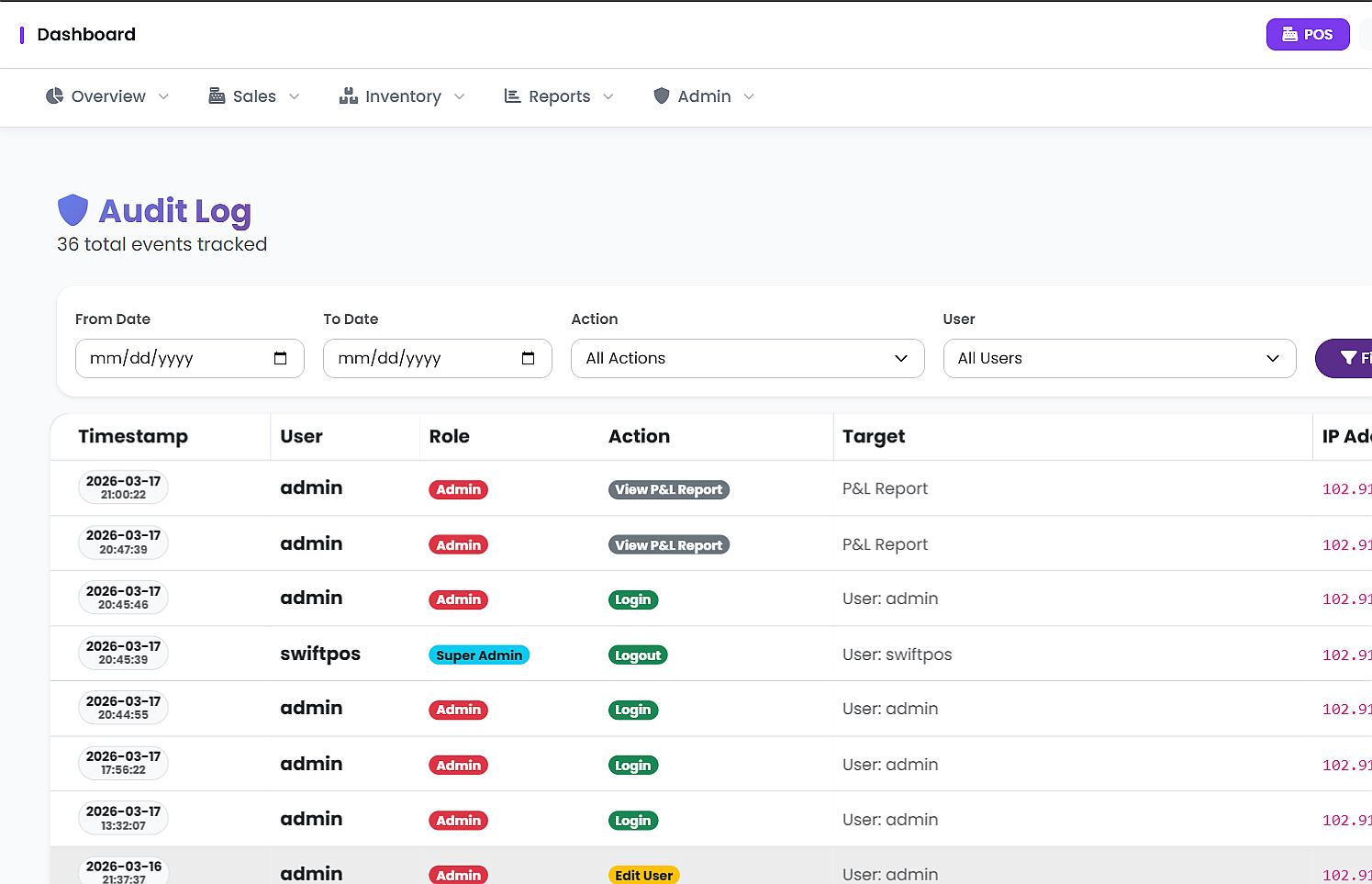
Business theft and fraud are real concerns for many shop owners. SwiftPOS takes security seriously with a comprehensive audit log that records every action taken in the system — who did what, when, and where.

On the Pro plan, you also get access to the Suspicious Activity Detection feature — which automatically flags unusual behaviour like repeated voided transactions, abnormal discount patterns, or access at odd hours.

8. Financial Reports: Understand Your Profitability
At the end of the day (literally), SwiftPOS helps you close out and balance your books with the End of Day Reconciliation feature.

Beyond daily closing, SwiftPOS generates full Profit and Loss (P&L) reports, giving you a clear picture of your revenue, cost of goods, and net profit. You can also export your data for accounting, tax filing, or further analysis.

9. Multi-Branch Management
If you own more than one shop or plan to expand, SwiftPOS has you covered with its multi-branch support available on the Pro plan. You can manage all your locations from a single account and compare performance across branches.

Each branch gets its own detailed performance view, and you as the owner maintain full visibility across the entire business — no matter where you are.

10. System Settings: Configure SwiftPOS for Your Business
SwiftPOS can be customised to fit your business through its system settings. Set your currency, configure VAT rates, manage receipt branding, and control how the system behaves — all without needing any technical knowledge.

SwiftPOS Pricing Plans
SwiftPOS is designed to be affordable for businesses of all sizes. Here's a quick look at the available plans:
| Plan | Price | Best For |
|---|---|---|
| Starter | ₦3,000/month | Small shops just getting started |
| Standard | ₦6,000/month | Growing retail businesses |
| Pro | ₦12,000/month | Multi-branch and high-volume businesses |
💡 Subscribe annually on any plan and get 1 month free.
Frequently Asked Questions
Do I need to install anything to use SwiftPOS?
No. SwiftPOS is cloud-based, which means you access it directly from your browser. No installation is required, and your data is always backed up automatically.
Can I use SwiftPOS on a mobile phone or tablet?
Yes. SwiftPOS is designed to work on any device with a browser — phone, tablet, laptop, or desktop.
What happens to my data if I lose internet connection?
SwiftPOS includes offline order support, so you can continue processing sales even when your connection drops. Data syncs once you're back online.
Can I manage more than one shop with SwiftPOS?
Yes. Multi-branch support is available on the Pro plan, allowing you to manage all your locations from one account.
Is my business data safe on SwiftPOS?
Yes. SwiftPOS uses cloud infrastructure with role-based access control, audit logs, and suspicious activity detection to protect your business data.
Ready to See SwiftPOS in Action?
SwiftPOS brings together everything you need to run your retail business — sales, inventory, staff, customers, reports, and multi-branch management — in one clean, affordable system.
Whether you're a small shop owner looking to get off paper-based records, or a growing business ready to take full control of your operations, there's a SwiftPOS plan that fits.
👉 Explore pricing plans at swiftpos.ng/pricing
💬 Or message SwiftPOS on WhatsApp: +2349164601810
Subscribe annually and get 1 month completely free on any plan.
